Payroll Software in Nepal with Full Salary & Tax Compliance
Run payroll without scattered salary sheets, manual tax calculations, or repeated finance work. NepalHRM processes salary, payslips, PF, CIT, SSF, eTDS, reimbursements, loans and increments in one connected payroll system.
- No credit card required
- Set up in one day
- Free onboarding
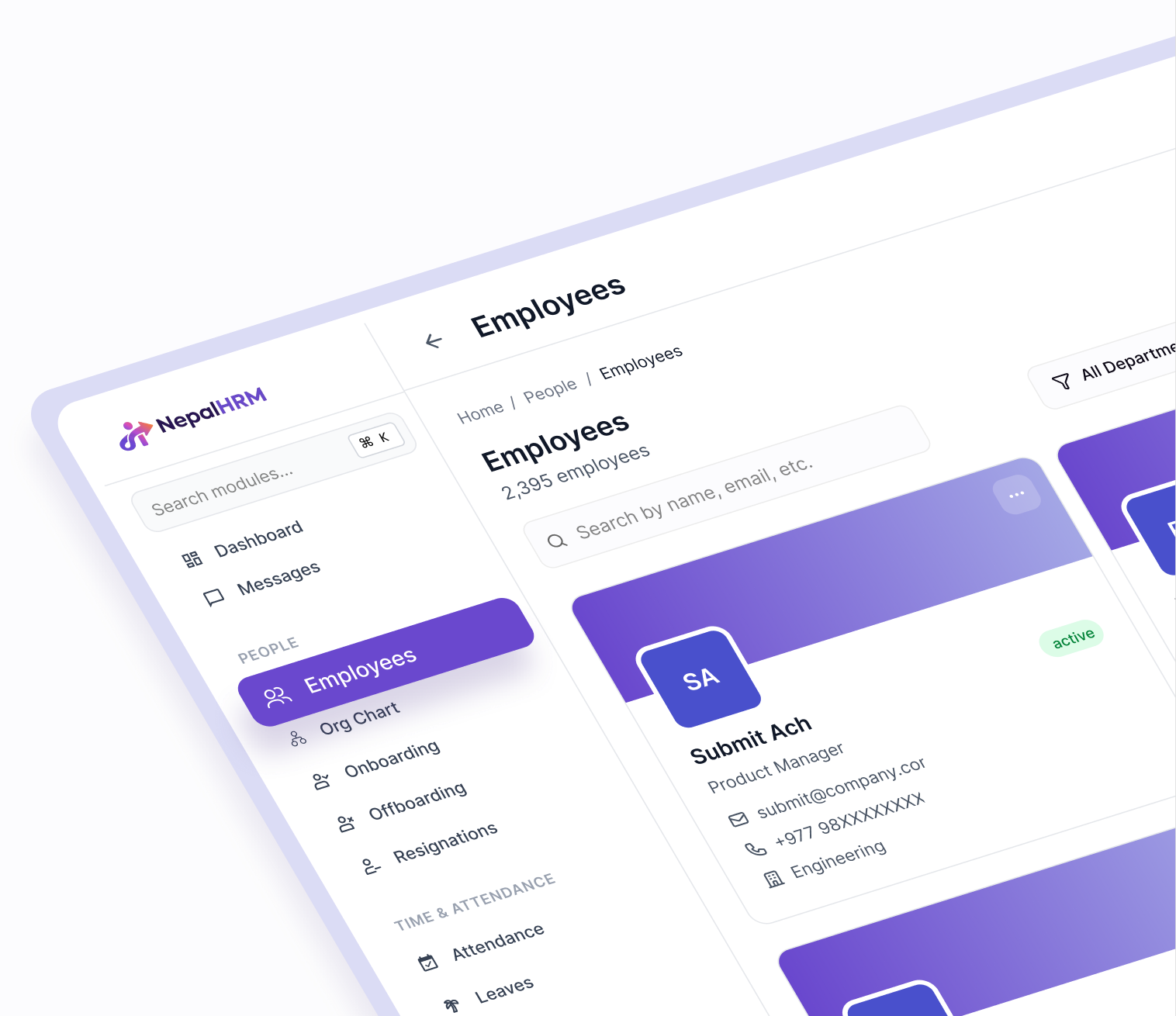
What does payroll software have to do in Nepal?
Payroll software calculates each employee's pay, the statutory deductions on it, and the reports those deductions create. In Nepal that is more than arithmetic: a run has to sit on the Bikram Sambat fiscal calendar, apply the current income tax slabs, handle Provident Fund, CIT and TDS, and produce a payslip the person receiving it can read. NepalHRM runs the whole month end in one workflow, from the attendance days that feed the draft through to the finance reports that close it.
- A payroll period is created in one click, and payslips, holds and paid status live in that same workflow.
- Salary components cover Basic, PF, employer PF, CIT, TDS and the rest, rather than being typed per employee.
- Finance reports cover the salary sheet, PF, eTDS, advances and the CIT optimizer.
- Nepal tax rates, caps, fiscal year, IRD metadata and attendance rules are payroll settings, not formulas in a spreadsheet.
- Dates carry Bikram Sambat and Gregorian together, because the payroll month is the Nepali one.
Last updated · Reviewed by Rajendra Regmi, Co-founder
Trusted by 500+ businesses in Nepal - from startups to giants
- 1-click
- Payroll Period Creation
- PF+CIT
- Built-in Nepal Deductions
- eTDS
- IRD-Compatible Reports
- BS/AD
- Nepali Date Support
Payroll Gets Messy When HR, Finance and Attendance Stay Separate
Most businesses in Nepal still manage payroll through Excel sheets, manual deductions, disconnected attendance records and repeated report formatting.
- Manual tax calculation
Income tax, PF, CIT, SSF and deductions can easily go wrong when every value is entered by hand.
- Salary sheets take too long
Finance teams spend hours checking gross salary, net payable, deductions, advances and reimbursements.
- Attendance affects pay
Late days, half-days, absences, leave and overtime become confusing when payroll is not connected to attendance.
- Reports need rework
PF, eTDS and salary reports often need manual formatting before submission or review.
NepalHRM Connects Payroll, Attendance, Salary and Reports
NepalHRM gives your payroll and finance team one system to configure salaries, generate payslips, track liabilities and prepare reports with less manual work.
What NepalHRM gives you
- Payroll periods, payslips, holds and paid status in one workflow
- Salary components for Basic, PF, PF Employer, CIT, TDS and more
- Payroll dashboard for gross, net payable, tax payable, PF + CIT and outstanding balances
- Finance reports for salary sheet, PF, eTDS, advances and CIT optimizer
- Loans, advances, reimbursements, contracts and salary increments
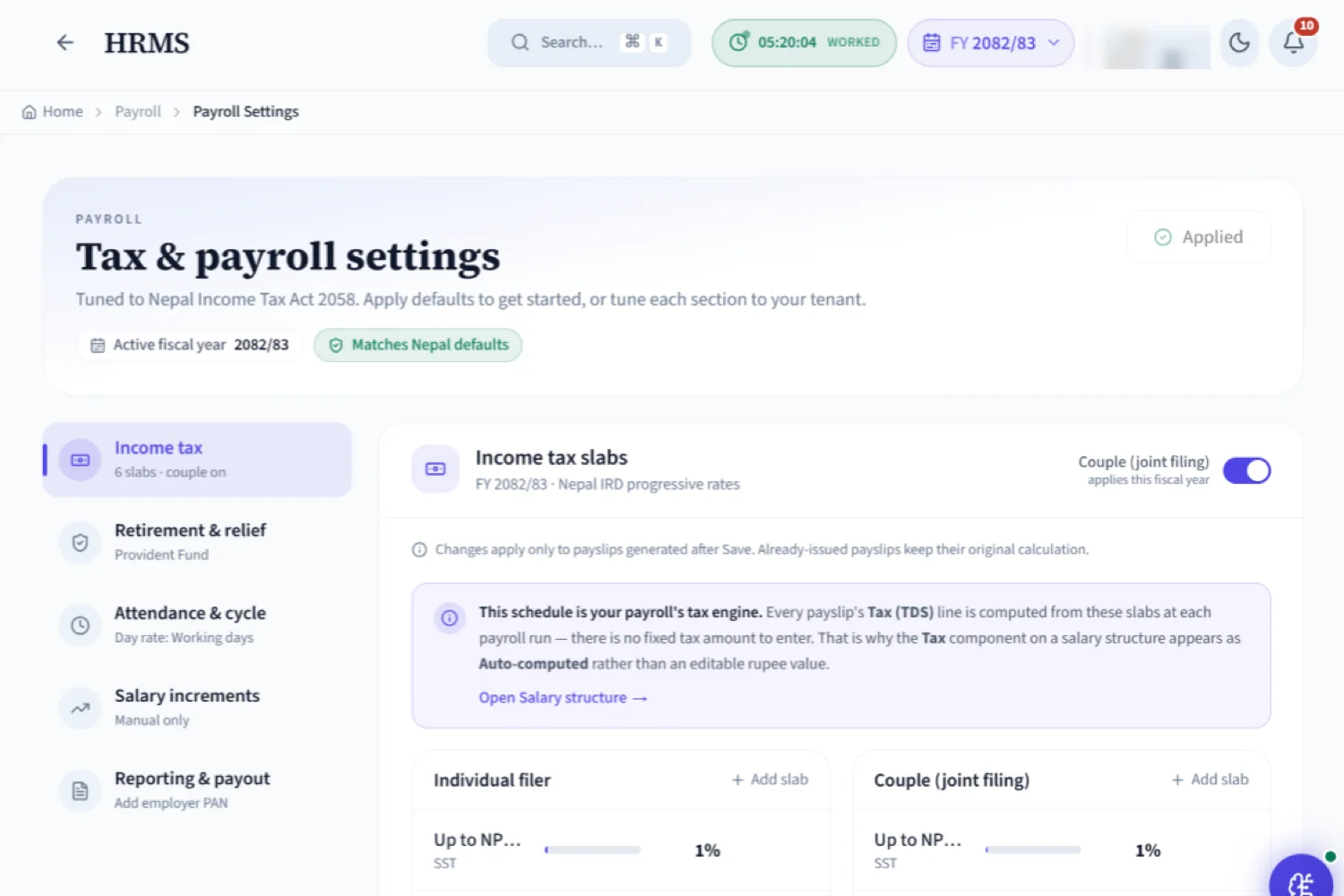
- Payroll settings for Nepal tax rates, caps, fiscal year, IRD metadata and attendance rules
Modules That Payroll Software Must Have to Run Payroll in Nepal
Manage salary structures, payroll periods, tax, PF, CIT, SSF, payslips, reports, forecasts, budgets, loans, increments and bank transfers from one clear payroll software built for businesses in Nepal.
Control payroll from one clear dashboard
See total employees, current payroll period, gross salary, net payable, tax payable, PF + CIT, loans, advances, reimbursements and payslip status from one place.
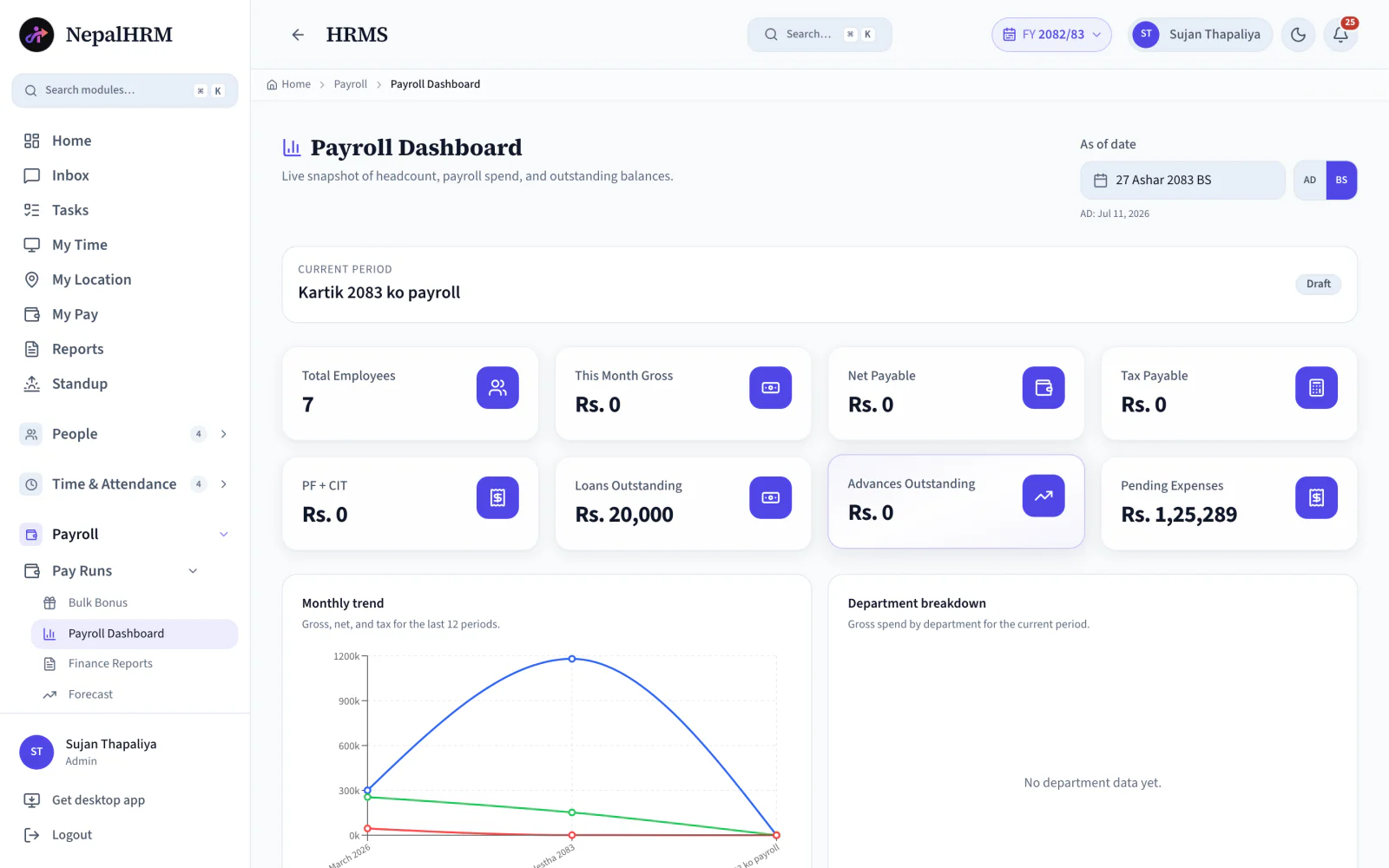
- Track headcount, monthly gross, net payable, tax, PF + CIT, loans and reimbursements at a glance.
- Review payslip status before salary is released.
- Use payroll trends and department breakdowns to understand salary cost clearly.
All Features for Running Payroll in NepalHRM
Manage salary setup, payroll periods, tax calculation, PF, CIT, SSF, loans, reimbursements, payslips, reports and salary data from one payroll system.
Select any feature to see the screen it runs on inside NepalHRM.
Auto Payroll Generation
Generate payroll from employee data, salary structures, deductions and payroll periods.
Pay Groups
Assign salary structures in bulk so similar employees follow the same payroll rules.
Payroll Periods
Create salary periods and manage payslips for each month or payroll cycle.
Payslip Generation
Generate payslips for eligible employees and keep salary history clear.
Salary Structure Setup
Create earnings, deductions, allowances and employer-contribution components.
Nepal Income Tax Engine
Calculate income tax on the unified FY 2083/84 IRD slabs for Nepal payroll.
PF, CIT and SSF Deductions
Manage PF, CIT and SSF deductions from your payroll settings.
CIT Optimizer
Plan CIT deductions and tax impact before payroll closes.
TDS Calculation
Calculate employee tax using configured fiscal year, slabs and rebate settings.
eTDS Report
Prepare IRD-compatible eTDS reports for payroll compliance.
Bank Transfer Report
Prepare transfer-ready bank reports from approved net pay and employee bank details.
Salary Sheet Report
Generate a complete salary sheet with basic, gross, deductions, tax and net pay.
What Does a Nepali Payslip Actually Look Like?
Set the gross, choose contribution system, and see PF, CIT, SSF and TDS, calculated from Basic, exactly the way NepalHRM runs payroll.
PF + CIT, CIT only and SSF are separate contribution systems in Nepal. Select the one applicable to your company or employee. PF, CIT, and SSF are all calculated from Basic (not Gross).
New for FY 2083/84: the separate single and married (couple) slabs have been merged into one table for all resident individuals. The 1% band now runs to NPR 10,00,000 and the top rate is 29% (was 39%).
Monthly Net Take-Home
NPR 70,050
Gross NPR 75,000, employee-side deductions only
Employee Deductions
Deducted from salaryAnnual TDS estimate ~ NPR 0
TDS is calculated based on annual taxable income (Gross - PF/CIT/SSF deductions) against the unified FY 2083/84 Nepal tax slabs.
Employer Cost
Paid on top of salaryTotal SSF deposited monthly: NPR 13,950 (31% of Basic). Employee NPR 4,950 (11%) + employer NPR 9,000 (20%).
The employer's 20% is paid on top of gross salary. It never reduces the employee's take-home.
This calculator is for demo estimation only. Actual payroll depends on company policy, salary structure, tax category, and applicable rules. NepalHRM applies the precise rules per employee in production.
One Payroll System, Different Views for Different Teams
Payroll is not only an HR task. NepalHRM gives HR, finance, managers and employees the right level of control without exposing sensitive salary data to everyone.
For HR Teams
HR can prepare employee salary details, manage increments, handle reimbursement requests and keep payroll records updated.
- Salary structure assignment
- Employee finance profile
- Increment request tracking
For Finance Teams
Finance can review payroll spend, tax, net payable, loans, advances and compliance reports before salary payout.
- Payroll dashboard
- Salary sheet and eTDS
- PF, CIT and SSF settings
For Employees
Employees get clearer salary records, reimbursement status, advance details and payslips without repeated HR messages.
- Payslip access
- Reimbursement requests
- Loan and advance visibility
More Built into Payroll Software
Small payroll controls save big time when finance needs accuracy, approvals, reports and clean salary records every month.
Reinstall Nepal Defaults
Restore default Nepal payroll settings when your team needs a clean starting point.
Day-Rate Methods
Calculate day rates by working days, calendar days or a fixed method based on company policy.
Payroll Review Queue
Review exceptions, adjustments, deductions and final salary before payroll closes.
Payroll Lock
Lock completed payroll periods so old salary records do not change accidentally.
Salary Adjustment Notes
Add notes for manual changes, bonuses, unpaid leave or special deductions.
Export Logs
Track when salary sheets, bank files and payroll reports are exported.
Payroll Preview
Preview net salary, deductions and payable amounts before final generation.
Payroll Reminders
Catch pending approvals, payroll periods and compliance tasks on time.
Move Payroll Away from Excel Without Losing Control
A good payroll system should reduce manual work, not remove finance control. NepalHRM keeps payroll rules visible, editable and reviewable before final salary payment.
Manual Payroll
- Repeated salary calculations every month
- PF, CIT, TDS checked manually
- Attendance and payroll stay separate
- Reports need reformatting before use
How to Set Up NepalHRM for Payroll?
NepalHRM payroll is not just a payslip generator. It connects salary structures, attendance rules, payroll periods, reimbursements, loans, increments and finance reports into one clean monthly process.
- Create salary components, salary structures, pay groups, tax rules, PF, CIT, SSF and payroll periods before running payroll.
- Add employees one by one or bulk import from CSV. Assign roles, departments, salary components and reporting managers. Your org chart builds itself.
- Approve leaves, track attendance, generate payslips and pull eTDS compliance reports, all from one dashboard.
Payroll Software Built for Every Business in Nepal
Payroll gets harder as teams grow, salaries change and compliance work increases. NepalHRM is built for businesses of every size, from every industry.
Payroll Connects Every Module
NepalHRM connects payroll with employee records, attendance, leave, shifts, hiring, performance, reports and workplace requests.
Payroll Software
Salary, bank details and PAN stored in employee profiles. Payroll pulls them automatically - one source of truth.
Attendance & Biometric
Biometric device IDs map to employee profiles. Every punch attaches to the right employee automatically.
Leave Management
Leave balances and approval routing connect to employee profiles. The reporting manager drives the workflow.
Recruitment & ATS
Click Hire on a candidate - NepalHRM instantly creates their employee profile. Zero duplicate entry.
Performance Management
OKRs and reviews assigned to employees. Bonus points visible in the employee profile.
Finance Reports
Every report - salary sheet, eTDS, PF - pulls employee names, PAN and salary live from profiles.
Simple, Transparent Pricing
No Hidden Fees
NepalHRM gives you enterprise-grade HR software at a price built for Nepali businesses of every size.
- All core HR modules
- PF, SSF, CIT & eTDS
- Onboarding support
- Multi-company support
- Nepal payroll compliance
- Biometric integration
- Regular feature updates
- BS + AD calendar
Free trial available - no card required · Setup fee waived on yearly billing · Cancel anytime
Access NepalHRM from the
Web, Android and iOS
Manage work from the desk, approve from mobile, and let employees access their HR details anytime.
What a Nepali Payroll Run Actually Has to Get Right
Four decisions and two deadlines, every month. This is the job the software above automates, described the way a finance team meets it.
1. It starts with the salary structure, not the gross
A Nepali salary is split into a basic component and allowances, and that split decides almost everything downstream. PF, SSF, CIT and gratuity are all assessed on basic. The overtime rate is derived from basic. Allowances are taxable but carry no contribution.
So two employees on the same NPR 40,000 gross can cost the company different amounts and take home different net pay, purely because their basic percentage differs. Set the split once per grade and let every run inherit it, rather than deciding it per employee per month.
There is a floor under all of it: the minimum remuneration fixed under the Labour Act 2074 is NPR 19,550 a month, published as NPR 12,170 basic plus NPR 7,380 dearness allowance, effective Shrawan 1, 2082.
2. One retirement scheme, never both
A company runs either the Social Security Fund or the older Provident Fund arrangement. Under SSF the employee contributes 11% of basic and the employer adds 20%, so 31% of basic reaches the fund each month. Under PF it is 10% from each side, usually with a voluntary CIT election of up to 33% of basic on top.
Either way the contribution reduces taxable income, but only up to the statutory retirement ceiling: the lowest of the actual contribution, NPR 500,000 a year, or one third of assessable income. Contributing beyond that ceiling still builds the employee's balance; it just stops reducing the tax.
- SSF contributors are exempt from the 1% social security tax charged on the first income band.
- The employer share is a cost of employment, not a payslip deduction, so it never reduces take-home pay.
- Switching scheme mid-year means two contribution histories in one fiscal year, which is why most companies switch at Shrawan.
3. Tax is annual, withheld monthly
TDS is not charged month by month in isolation. The employer projects the employee's annual income, deducts the allowable retirement contribution, applies the FY 2083/84 slabs to what remains, and withholds one twelfth of the result each month. A salary revision in Poush therefore changes every remaining month of the year, not just that one.
The 2083/84 budget merged the separate single and couple schedules into one table for every resident natural person: 1% up to NPR 1,000,000, 10% NPR 1,000,001 to NPR 1,500,000, 20% NPR 1,500,001 to NPR 2,500,000, 27% NPR 2,500,001 to NPR 4,000,000, 29% above NPR 4,000,000.
4. The month is a Bikram Sambat month
Nepal's statutory deadlines are counted from the end of the BS month, and the fiscal year runs Shrawan to Ashad. Payroll defined on Gregorian months adds a reconciliation step to every single period, and the mismatch shows up first at the year boundary when the slabs change.
- SSF or PF contributions: deposited within 15 days of the month ending.
- Withheld tax and the corresponding return: within 25 days of the month ending.
- Slab changes arrive with the budget, before Shrawan, so the first run of the year is the one most likely to be wrong.
5. What payroll accounting needs out of the run
Payroll is where a large share of a Nepali company's accounting entries originate, so the run has to end in documents finance can post and an auditor can follow, not in a spreadsheet somebody edited afterwards.
- A salary register: every employee's basic, allowances, gross, each deduction and net pay, for the period.
- A bank transfer file in the format the company's bank accepts, built from approved net pay.
- Contribution totals for the SSF or PF deposit, and the eTDS file in IRD format for the withholding return.
- Salary cost split by department or branch, and by project where donor funding has to be reported separately.
- A locked period and an export log, so a closed month cannot quietly change after the accounts are drawn.
Put a number on any of it before you commit: the salary tax calculator and the SSF contribution calculator are free, and the glossary defines the payroll cycle, TDS and the Nepali fiscal year with their statutory sources.
Frequently Asked Questions
Everything you need to know about NepalHRM payroll before you get started.
Yes. We monitor IRD notices and SSF circulars and update the system when rules change, so your payroll stays compliant without manual updates.
Yes. Our Enterprise plan supports multi-company setups with separate payroll settings per entity and consolidated reporting.
After approving payroll, generate bank-ready transfer files (NIC Asia, Nabil, Global IME, NBL, and more) in the formats each bank requires.
Yes - prorated salaries, leave encashment, and final settlements are automated for any cycle.
Yes, through the mobile app or web self-service, once the payroll period is marked paid. The payslip opens as a page and saves through the browser, so there is no password to enter. HR can also switch on a rule that notifies employees when a payslip is published.
Official Compliance Sources
NepalHRM tracks the rules published by Nepal's statutory authorities. We monitor these sources and update the system when PF, CIT, SSF or IRD tax rules change - you can verify every figure on this page directly with the source.
Payroll is one module of the all-in-one HR software for Nepal, so the payable days it reads come from the same attendance log HR already approved.
Payroll terms, defined
How a Nepali salary is built and taxed, each definition traced to the Act or rate it comes from.
- Basic Salaryआधारभूत तलबBasic salary is the fixed core of an employee's pay, before allowances, overtime and bonuses. In Nepal it is also the base every statutory contribution is assessed on, which makes it the most consequential number in a salary structure.
- Gross Salaryकुल तलबGross salary is an employee's total earnings for a period before any deduction: basic salary plus every allowance, overtime and taxable benefit. It is the figure most offer letters quote and the one employees compare against.
- Cost to Company (CTC)Cost to company is the total annual cost of employing someone: gross salary plus the employer's own statutory contributions, festival expense, and any benefit the company funds. It is always higher than gross, and higher again than net pay.
- Net Payखुद तलबNet pay is the amount that actually reaches an employee's bank account: gross salary minus the retirement contribution, any voluntary CIT election, monthly TDS, and any other authorised deduction such as a salary advance.
- Leave Encashmentबिदा सटहीLeave encashment is the conversion of an unused leave balance into money. In Nepal it applies to home leave that has accumulated beyond the ninety-day ceiling, and to the remaining balance when an employee leaves.
All HR and payroll terms used in Nepal are defined in the glossary, each with the Act or rate it comes from.
Payroll, by sector
PF, CIT, SSF and eTDS work the same way everywhere. What changes by sector is the shape of the salary above them, and how the payable days are counted.
- Manufacturing & constructionFive overtime rate tiers rather than one, and contract labour that expires on a date instead of running quietly past it.
- Banks & financeGrade, level and step-based salary structures, with role-based access and a full audit trail over every change.
- NGOs & INGOsOne salary attributed across grants: staff booked to a project for a fixed NPR amount over a dated window.
All eight sector setups are on the HR and payroll software by industry hub, each one a configuration of the same platform rather than a different product.
Run Payroll with More Control and Less Manual Work
Stop rebuilding salary sheets every month. Use NepalHRM to manage payroll records from one connected payroll software built for Nepali companies.
- No credit card
- Free onboarding
- Set up in one day
- Cancel anytime